
A child types a homework question into a regular search box, and a page no adult wanted on screen loads instead. Plenty of families have lived through that moment.
Kiddle, a free search engine at kiddle.co, is built to prevent it. It runs on Google SafeSearch, puts editor-picked pages first, and shows results in large type with big pictures. Below: setup, tabs, and where the filters still miss.
How to use Kiddle in 2026: five steps from search box to homework answer
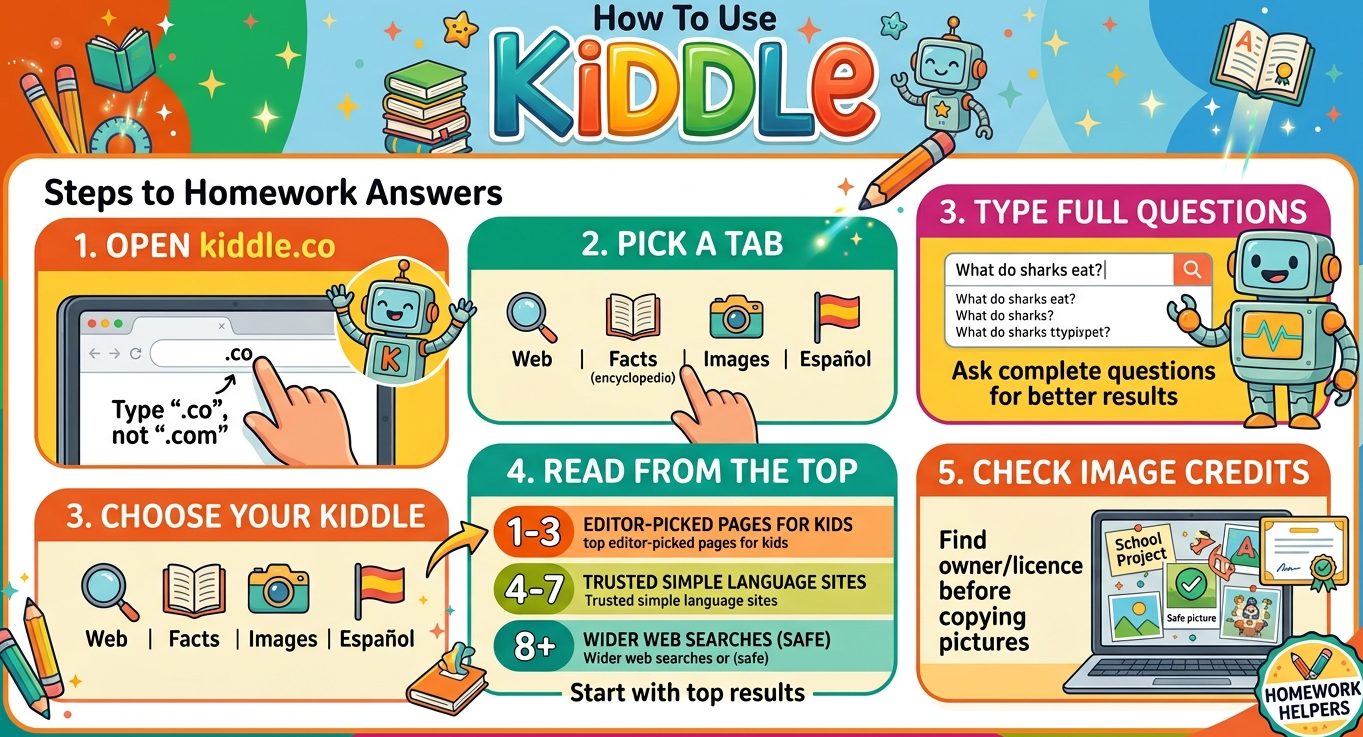
Step 1: Open kiddle.co, not kiddle.com
Type kiddle.co into the address bar. Kiddle says the “.co” stands for “children only.” The .com address is a different site.
Kids don’t need an account or login. The homepage shows a search box, a cartoon robot and a daily trivia question.
Step 2: Pick the right Kiddle tab
Five tabs sit under the search box. Web returns regular results. Facts opens Kpedia, Kiddle’s encyclopedia for kids.
Images searches the wider web for safe pictures. Kimages pulls pictures from Kpedia articles alone. Español switches to the Spanish version.
Step 3: Type a full question
Kids tend to type one word. “Sharks” brings a loose mix of pages. “What do sharks eat?” brings sharper ones.
If a query holds a blocked word, Kiddle’s guard robot stops the search and shows a warning in place of results.
Step 4: Read results from the top down
Kiddle sorts results into three bands, according to its About page. Results 1 to 3 are pages written for kids, picked and checked by editors.
Results 4 to 7 come from trusted sites that use simple language, also editor-picked. From result 8 on, pages are written for adults and pass through Google SafeSearch alone.
Younger kids should stay with the first three. Older kids can scroll for more depth.
Step 5: Check image credits before copying a picture
Big thumbnails make it easy to grab pictures for school projects. Each one still has an owner. Teach kids to find the credit and licence attached to an image and add it to their work.
Is Kiddle owned by Google?
No. Kiddle runs on Google’s custom search tool and SafeSearch, but it states it is not affiliated with Google LLC. The domain was registered in 2014.
The four-color logo causes most of the mix-ups. Google’s homepage has changed a lot since its grey 1998 version, yet those colors stayed, and Kiddle borrowed them.
Google does not run a separate search site for children. It offers SafeSearch and Family Link settings instead, which is why many families treat Kiddle as the kid-friendly version of Google.
What age group is Kiddle for, and is it safe for a 7-year-old?
Kiddle targets primary-school kids, about ages 4 to 12. The EU’s Better Internet for Kids guide lists 4 as the minimum age.
A 7-year-old sits in the middle of that range. The filters fit that age, though an adult in the room still catches what filters miss.
Kids near 12 often find the results thin on detailed topics. By the teen years most have moved to Google, games and social apps, and Pew data shows 85% of US teens aged 13 to 17 play video games.
Kiddle vs Google SafeSearch: what each filter catches
SafeSearch is a setting inside Google. It hides explicit results, but the rest of Google stays the same, from shopping ads to the hidden games and page tricks built into search.
Kiddle adds two layers on top of SafeSearch. Editors choose the top results, and a keyword list blocks risky searches before they run.
Where Kiddle blocks too much
Strict word lists catch innocent searches. In 2016, queries like “breast cancer” and “sperm whale” returned a bad-word warning.
Kiddle also drew criticism that year for blocking LGBT terms. It later restored kid-safe results for those searches.
Where Kiddle lets things through
Ads appear on Kiddle pages. A teacher review on Common Sense Education called them non-invasive, but kids still need to learn which links are ads.
A 2016 test by Malaysian news site SAYS pulled up results for “Fifty Shades of Grey.” No block list is ever complete.
Setting up Kiddle at home and in classrooms
Make kiddle.co the start page
Set Kiddle as the homepage on family PCs, tablets and class devices. With no login, setup on a shared machine takes about a minute.
Send Kiddle words and sites to block
Every Kiddle page links to two forms in its footer: Keyword blocking and Site blocking. Parents and teachers can use them to flag anything that slipped through.
Close the gaps Kiddle can’t cover
Nothing stops a child from typing google.com into the address bar. Device-level parental controls shut that route.
Set daily time caps as well. Kids aged 5 to 12 average 45 to 60 minutes per console session, per ESA figures, so search time and game time stack up.
Not all screen time is equal. Studies on gaming and cognitive skills report small gains, and Kiddle research builds reading and fact-checking. Ask your child what they found, and why they trust it.
FAQs
Is there a Kiddle app?
No official Kiddle app exists. Kiddle runs in any browser at kiddle.co on phones, tablets and computers. Third-party wrappers, such as the Safer Web iPad app, lock Kiddle in as the start page.
Is Kiddle free to use?
Yes. Kiddle costs nothing and needs no account for children, schools or classes. It does show ads, so younger kids may need help telling ads apart from search results.
Does Kiddle track what kids search?
Kiddle says it collects no personally identifiable information and deletes its logs every 24 hours. Children never create profiles, so no search history is tied to a name.
What do parents on Reddit say about Kiddle?
Reddit parenting and teaching threads tend to call Kiddle a good first filter, not a complete fix. Common complaints cover over-blocked health terms and thin results for older children.